
Meta Pixel vs Conversions API: Which Is Better for Measuring Ad Performance?
Reading Time: 9 min
 Share this article
Key Takeaways
- Understand the differences between Meta Pixel and Conversions API, how event deduplication works, and why combining browser, server-side and CRM tracking helps businesses measure genuine leads and sales more accurately.
- What the Pixel and the Conversions API Do
- Why Pixel-Only Tracking Misses Conversions
- Is the Conversions API More Accurate? Not Automatically
- Running Both Without Double-Counting
If Meta Ads Manager reports 120 leads this month and your sales team can only find 40 genuine enquiries, the problem may not be your ads. It may be your tracking.
Most guides treat this as a choice between the Meta Pixel and the Conversions API. For most businesses, it isn't one. Meta recommends running both together, with deduplication set up so the same conversion isn't counted twice. And if your real conversion happens after the click, such as a site visit, an admission or a confirmed order, you also need to send that outcome to Meta from your CRM or backend.
What the Pixel and the Conversions API Do
The Meta Pixel (formerly the Facebook Pixel) is a piece of JavaScript on your website. When someone views a page, submits a form or completes a purchase, the code runs in their browser and reports that action to Meta.
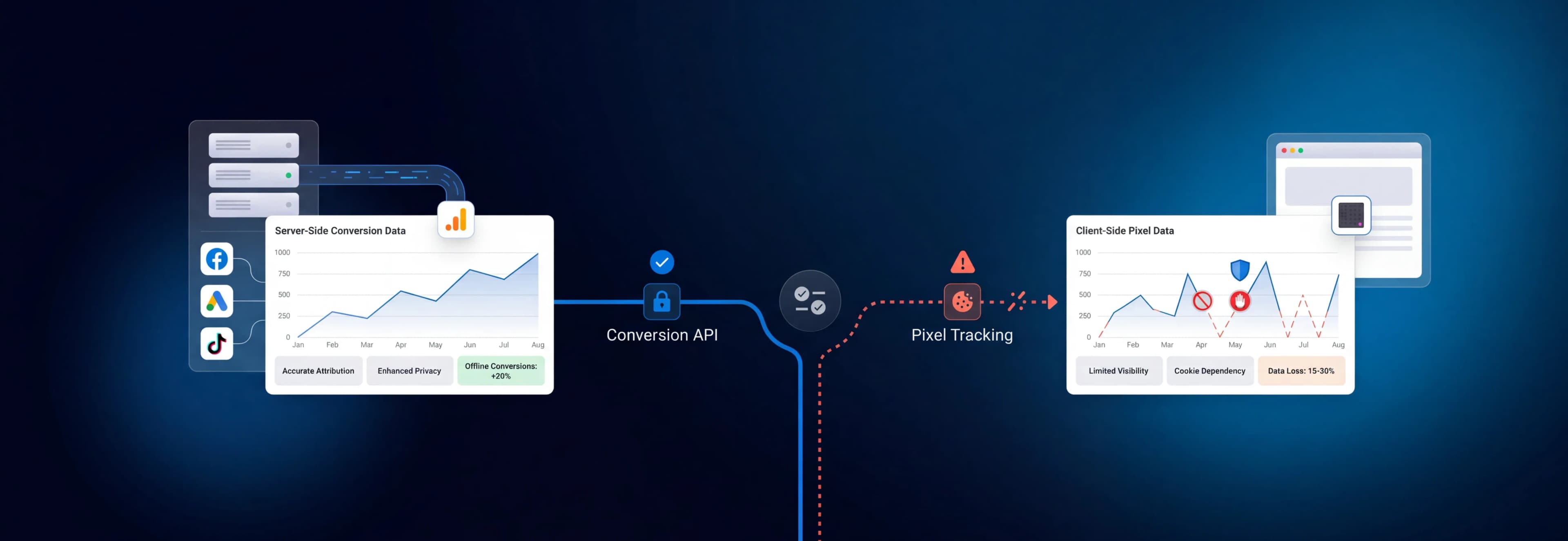
The Conversions API (CAPI) does the same job from a different place. Your server, website platform, or CRM sends the event data to Meta directly. According to Meta's developer documentation, CAPI can carry website, app, business messaging and offline events, and Meta processes these server events much like Pixel events for measurement, reporting and optimisation.
| Comparison | Meta Pixel (Browser-Side) | Conversions API (Server-Side) |
|---|---|---|
| Where it runs | The visitor's browser | Your server, platform or CRM |
| Affected by ad blockers and browser restrictions | Yes | Less affected; depends on how events are generated |
| Can send offline or CRM outcomes | No | Yes |
| Main risk | Missing events | Duplicates, wrong mapping, weak customer data |
Why Pixel-Only Tracking Misses Conversions
Because the Pixel depends on the browser, anything that interferes with the browser interferes with your data. An ad blocker, browser tracking protection, a declined consent banner or a payment redirect that never returns the buyer to your thank-you page can all stop an event from reaching Meta.
Loss percentages quoted online rarely come with a published method, and the real figure varies by website. The bigger problem is that the gap is invisible. Ads Manager simply shows fewer conversions, Meta's delivery system learns from fewer real buyers or leads, and your cost per result looks worse than it is.
Is the Conversions API More Accurate? Not Automatically
Server-side tracking is less exposed to browser restrictions, but a poorly built setup can produce worse data than the Pixel alone. The usual problems include:
- Duplicate events: If the Pixel and CAPI both report the same purchase without deduplication, your conversions are inflated.
- Wrong event mapping: A Lead event that fires when the form page loads, rather than when the form is submitted, reports leads that never happened.
- Thin customer information: Meta has to match each server event to a person. Without customer data such as a hashed email, phone number or click ID, matching suffers. For website events, Events Manager shows this as an Event Match Quality score out of 10.
- Tracking the wrong events: Every page view and click adds noise. Send the events that represent business value.
Running Both Without Double-Counting
Meta calls the combination of Pixel and CAPI a "redundant setup". The Pixel captures browser behaviour as it happens, and the server can still report a conversion when the browser event is blocked, provided your server records it independently.
The catch is deduplication. Meta's recommended method:
- Create a unique
event_idfor each conversion. An order ID or lead ID works well. - Send that same ID with both the Pixel event and the server event, to the same Pixel.
- Use an identical event name on both, such as
PurchaseorLead.
When the ID and event name match, Meta generally keeps one event and discards the duplicate, as long as the second arrives within 48 hours of the first. Meta also supports deduplication using the browser identifier (fbp) or your own external_id, but its documentation notes this generally works only when the browser event arrives first, so event_id is the more dependable choice.
The One-Click Option
Conversions API setup often meant developer time or a partner integration. In April 2026, Meta announced a free, one-click Meta-enabled Conversions API in Events Manager for advertisers who already have a Pixel. If it's available in your account and you have no server-side tracking yet, it's a reasonable starting point.
It covers website events only and is built around your existing Pixel. It won't send CRM lead stages or offline sales, which is often the data that matters most.
When the Real Conversion Happens After the Click
A real estate developer, hospital, college or B2B company earns revenue when a lead books a site visit, attends a consultation, takes admission or signs a contract, not when a form is filled. None of that happens on the website, so the Pixel never sees it.
Lead Ads (Instant Forms)
Many real estate and education advertisers collect leads through forms that open inside Facebook or Instagram. The submission happens on Meta, so the Pixel doesn't capture it. To show Meta which leads become customers, you send lead outcomes from your CRM through Meta's Conversions API for CRM and use the Conversion Leads performance goal, which Meta says currently works only with Instant Forms. Meta's fit criteria include at least 200 leads a month, with the lead stage you optimise for happening within 28 days and converting at between 1% and 40%.
Offline and CRM Events
Site visits, clinic appointments and closed deals can be sent from your CRM through the Conversions API. Meta set May 2025 as the end date for its separate Offline Conversions API and now directs offline events through the main Conversions API.
Cash-on-Delivery Orders
A Pixel Purchase event usually fires when an order is placed, even if a COD order is later refused. Sending confirmed orders from your backend gives Meta a cleaner revenue signal. Timing matters: Meta rejects server events with a timestamp more than 7 days old, so confirm at a stage that happens within that window rather than waiting for a delivery that may take longer.
Which Setup Fits Your Business?
- Pixel only: Acceptable for a small, simple website with low conversion volume and no CRM, if you accept some unreported conversions.
- Pixel plus Conversions API, deduplicated: The default for most advertisers spending meaningfully on Meta, especially e-commerce brands optimising for purchases.
- Pixel plus CAPI plus CRM or offline events: The right setup for real estate, healthcare, education and B2B, where the valuable conversion happens after the first interaction.
Healthcare and wellness advertisers should first check their data source category in Events Manager. Since early 2025, Meta has begun categorising some data sources as health and wellness and limiting which events they can share. These limits cover data sent through Meta's business tools, including the Conversions API, so server-side tracking isn't a way around them.
How to Check Your Tracking Is Working
Before trusting your Meta conversion tracking, run these checks:
- Use Test Events in Events Manager to confirm each key event fires once, at the right moment.
- Confirm that browser and server versions of the same action are deduplicated.
- Review Event Match Quality on your website conversion events and note which customer information Meta reports as missing.
- Compare Meta-reported conversions with your CRM or order system for the same period. Some difference is normal because Meta uses its own attribution rules. A large or growing gap means something is broken.
If the numbers look healthy but results remain weak, review your creative, audience targeting, offer, and sales follow-up, and use these landing page optimisation tips to identify conversion gaps and improve campaign performance.
A Note on Consent
Server-side tracking reduces your dependence on the browser, not your legal obligations. The consent standard in India's Digital Personal Data Protection Act, 2023 is free, specific, informed, unconditional and unambiguous consent. Under the DPDP Rules notified in November 2025, the main notice and consent obligations take effect in May 2027. Until then, existing obligations under the IT Act still apply. The Act also restricts tracking and targeted advertising directed at children (anyone under 18), subject to limited exemptions in the Rules, which matters for education brands whose prospects may be minors.
Share only customer data you have a lawful basis to share, hash personal identifiers as Meta requires, and get legal advice on your specific setup.
Tracking Decides What You Pay For
The Pixel vs Conversions API question is really about which signals your campaigns learn from. Better tracking doesn't guarantee better results, but it decides whether your budget decisions reflect what happened.
At Wisoft, performance work starts here: measuring qualified leads, revenue and acquisition cost rather than raw form fills. Whether you manage Meta Ads in-house or work with a PPC agency in Bangalore, one test is worth applying: would your sales team recognise the conversions your ads are reporting?
Frequently Asked Questions
Which is better for measuring ad performance: the Meta Pixel or the Conversions API?
Neither works best alone. The Pixel captures on-site behaviour in the browser but misses events that are blocked. The Conversions API sends events from your server or CRM, including offline outcomes. Meta recommends running both, deduplicated, and adding CRM events if your sales happen after the click.
Will running the Pixel and Conversions API together double-count conversions?
Only if deduplication isn't set up. Send the same event_id and event name from both sources, and Meta generally keeps one event and discards the other.
Is Conversions API setup difficult?
For basic website events, Meta's one-click option (where available) needs no developer. Connecting a CRM, sending offline conversions or passing richer customer data usually needs a partner integration or development support.
Does server-side tracking remove the need for user consent?
No. Moving tracking to your server changes how data reaches Meta, not whether you're allowed to share it. Consent and data protection obligations still apply.
Will the Conversions API make Meta's numbers match my CRM?
Not exactly. It improves how reliably events reach Meta, but Meta still credits conversions using its own attribution rules. Treat your CRM or order system as the record of what actually sold.